

A Text Message That Almost Got Me
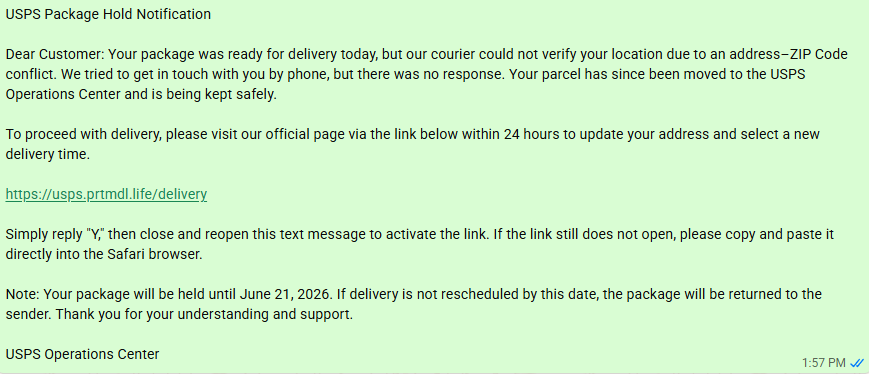
I received a text message this week that looked, at first glance, completely legitimate. It read:
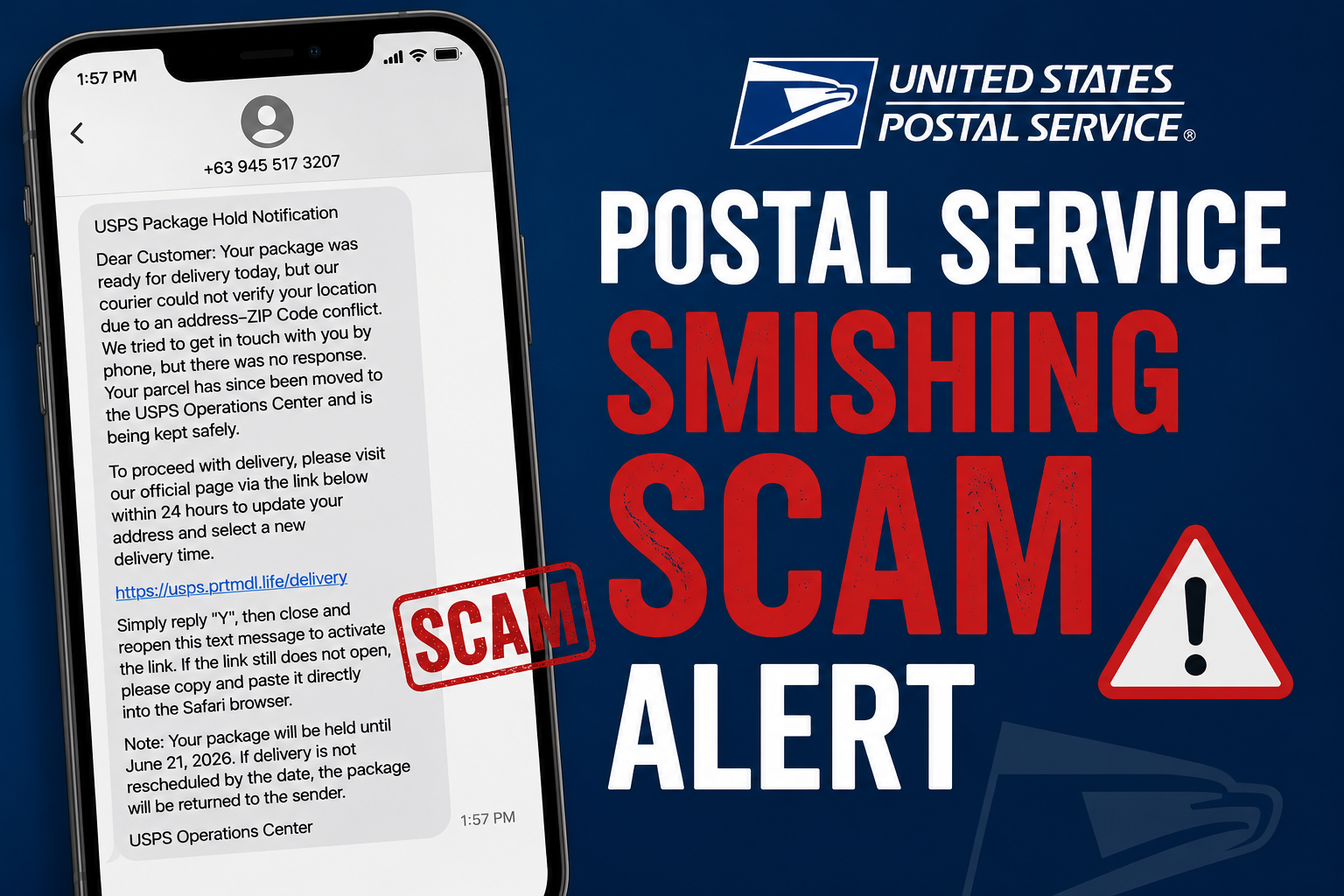
“USPS Package Hold Notification. Dear Customer: Your package was ready for delivery today, but our courier could not verify your location due to an address-ZIP Code conflict. We tried to get in touch with you by phone, but there was no response. Your parcel has since been moved to the USPS Operations Center and is being kept safely. To proceed with delivery, please visit our official page via the link below within 24 hours to update your address and select a new delivery time.”
The message included a link, instructions to reply “Y” to activate it, and a deadline of June 21, 2026, after which my supposed package would be returned to sender.
There is just one problem. I was not expecting any package. And the United States Postal Service does not send text messages like this. I am sharing this one with you, word for word, because if you have a cell phone, you are going to receive a version of this exact message sooner or later. This is called smishing, and it has become one of the most common scams hitting American phones today.
Breaking Down the Scam Line by Line
Let’s pick apart exactly why this message is fake, because the techniques used here show up in nearly every smishing attempt regardless of which company or agency the criminals are impersonating.
The vague, official-sounding language. Phrases like “address-ZIP Code conflict” and “USPS Operations Center” sound technical and authoritative, but they are not real terminology the Postal Service actually uses in customer communications. Scammers use official-sounding jargon specifically because it discourages questioning.
The manufactured urgency. I was given a 24-hour deadline, with the threat that my package would be returned if I did not act immediately. Smishers rely on psychological manipulation to bypass your defenses, generally creating a false sense of urgency or fear that pushes you to react before thinking it through.
The suspicious link. The text directed me to usps.prtmdl.life, a domain that has absolutely nothing to do with the real United States Postal Service, which uses usps.com. The fake domain was built specifically to look vaguely official to someone skimming a text message on a small phone screen.
The bizarre “reply Y” instruction. This is one of the more devious tricks in the modern smishing playbook. Many mobile carriers and phones automatically disable links in text messages from unknown or unverified senders as a security measure. By instructing victims to reply “Y” first, scammers are attempting to trick the phone’s spam filtering system into treating the conversation as a legitimate back-and-forth exchange, which can cause the link to become clickable. In other words, that instruction is not a harmless formality. It is a deliberate attempt to defeat the very security feature designed to protect you.
What Smishing Actually Is
Smishing, short for SMS phishing, is a cyberattack where scammers use deceptive text messages to trick victims into handing over personal information, downloading malware, or sending money. Attackers often impersonate trusted entities like banks, government agencies, or delivery services, using urgent language to manipulate targets into clicking malicious links.
The attack generally follows a predictable pattern. First comes the lure, an unexpected text containing a fake alert such as suspicious bank activity or a held package. Then comes the hook, language designed to create a false sense of urgency or fear. Then comes the trap, a call to action such as clicking a malicious link or calling a fraudulent phone number. Finally comes the compromise, where clicking the link may secretly download malware onto your phone or direct you to a fake website designed to steal your passwords, credit card numbers, or Social Security number.
Delivery scams like the one I received are extremely common right now, but they are far from the only flavor. Banking alert scams pretend to be your bank warning of unauthorized account access, directing you to a spoofed login page to verify your identity. Government impersonation scams claim to be a tax authority or law enforcement agency, often threatening legal action or fines unless you click a link to resolve the issue immediately.
How to Protect Yourself
Never click links in unexpected texts. If you get an alert from a legitimate organization, log into their official website or app directly, or call a verified customer service number instead. The real USPS website is usps.com, and if you genuinely have a package issue, you can check it there directly without ever touching a link from a text message.
Do not reply, not even to opt out. Even if a scam message says reply STOP to opt out, avoid responding. Doing so merely confirms to the scammer that your phone number is active and worth targeting again. The “reply Y” instruction in the message I received is a perfect example of why this rule matters even more than usual.
Be suspicious of urgency. Legitimate companies and government agencies rarely demand immediate action or sensitive information via text message. A 24 hour deadline on a package you never ordered is a glaring red flag.
Report it. You can forward suspicious text messages to the spam reporting service 7726, which spells SPAM on your keypad, to help mobile carriers identify and block the attackers. This takes about ten seconds and helps protect the next person who receives the same message. You can also file a complaint with the Federal Communications Commission at fcc.gov.
When in doubt, delete. If you are not expecting a package, you almost certainly do not have one waiting. Delete the message and move on with your day.
I receive cybersecurity scam attempts constantly given my background, and this one was crafted well enough that I wanted to walk you through it carefully. If a message like this lands in your phone this week, you will now know exactly what you are looking at.
Stay safe out there, and I will see you next week!
Feeling lost in the digital world? Dr. Tom is here to help!
References
- Proofpoint. “What Is Smishing?” https://www.proofpoint.com/us/threat-reference/smishing
- Federal Communications Commission. “Avoid the Temptation of Smishing Scams.” https://www.fcc.gov/avoid-temptation-smishing-scams
- UIC Office of Technology Solutions. “Security Alert: SMS Phishing Attempt (Smishing).” https://it.uic.edu/news-stories/security-alert-sms-phishing-attempt-smishing/
- Adaptive Security. “Smishing: SMS Phishing in Cybersecurity.” https://www.adaptivesecurity.com/blog/smishing-sms-phishing-cybersecurity
Sign up for our Sunday Spectator. Delivered to your inbox every Sunday, with all the news from the week.

Thomas Hyslip lives in Tega Cay with his wife and daughter. After 27 years in the U.S. Army and Federal Law Enforcement, he retired to pursue his passion for teaching. Tom is now an Assistant Professor of Instruction at the University of South Florida. In 2 short years he has won 10 awards from the South Carolina Press Association, including first place in column writing, education beat reporting and best podcast.